Contents
-
Vala GTK+ Examples
- Basic Sample
- Setting an Application Icon
- Synchronizing Widgets
- Toolbar, Scrollable Text View and File Chooser
- Creating a Dialog
- Loading User Interface from XML File
- Tips and Tricks
- TreeView with ListStore
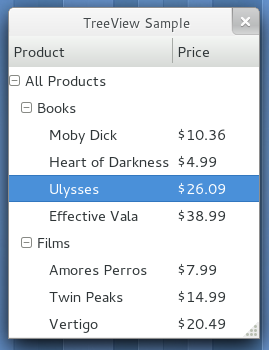
- TreeView with TreeStore
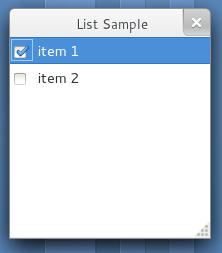
- TreeView with CellRendererToggle
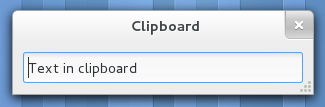
- Clipboard
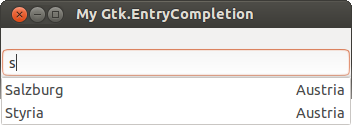
- EntryCompletion with two cells
Vala GTK+ Examples
Note: These examples require GTK+ 3.x installed, e.g.
Fedora >= 15: gtk3-devel
openSUSE >= 11.4: gtk3-devel
Ubuntu >= 11.04: libgtk-3-dev
If you're still developing for GTK+ 2.x you can find examples on the GTK+ 2.x version of this page.
Basic Sample
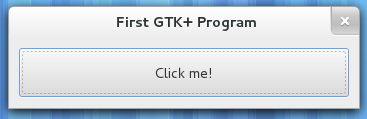
This sample demonstrates how to create a toplevel window, set its title, size and position, how to add a button to this window and how to connect signals with actions.
using Gtk;

int main (string[] args) {
    Gtk.init (ref args);

    var window = new Window ();
    window.title = "First GTK+ Program";
    window.border_width = 10;
    window.window_position = WindowPosition.CENTER;
    window.set_default_size (350, 70);
    window.destroy.connect (Gtk.main_quit);

    var button = new Button.with_label ("Click me!");
    button.clicked.connect (() => {
        button.label = "Thank you";
    });

    window.add (button);
    window.show_all ();

    Gtk.main ();
    return 0;
}
All GTK+ classes are inside the Gtk namespace. You must initialize every GTK+ program with Gtk.init ().
Compile and Run
$ valac --pkg gtk+-3.0 gtk-hello.vala
$ ./gtk-hello
Setting an Application Icon
try {
    // Either directly from a file ...
    window.icon = new Gdk.Pixbuf.from_file ("my-app.png");
    // ... or from the theme
    window.icon = IconTheme.get_default ().load_icon ("my-app", 48, 0);
} catch (Error e) {
    stderr.printf ("Could not load application icon: %s\n", e.message);
}
Synchronizing Widgets
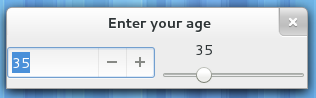
You can use signals in order to synchronize the values of widgets. In this example a spin button and a horizontal scale will get interlocked.
using Gtk;

public class SyncSample : Window {

    private SpinButton spin_box;
    private Scale slider;

    public SyncSample () {
        this.title = "Enter your age";
        this.window_position = WindowPosition.CENTER;
        this.destroy.connect (Gtk.main_quit);
        set_default_size (300, 20);

        spin_box = new SpinButton.with_range (0, 130, 1);
        slider = new Scale.with_range (Orientation.HORIZONTAL, 0, 130, 1);
        spin_box.adjustment.value_changed.connect (() => {
            slider.adjustment.value = spin_box.adjustment.value;
        });
        slider.adjustment.value_changed.connect (() => {
            spin_box.adjustment.value = slider.adjustment.value;
        });
        spin_box.adjustment.value = 35;

        var hbox = new Box (Orientation.HORIZONTAL, 5);
        hbox.homogeneous = true;
        hbox.add (spin_box);
        hbox.add (slider);
        add (hbox);
    }

    public static int main (string[] args) {
        Gtk.init (ref args);

        var window = new SyncSample ();
        window.show_all ();

        Gtk.main ();
        return 0;
    }
}
Compile and Run
$ valac --pkg gtk+-3.0 gtk-sync-sample.vala
$ ./gtk-sync-sample
Toolbar, Scrollable Text View and File Chooser
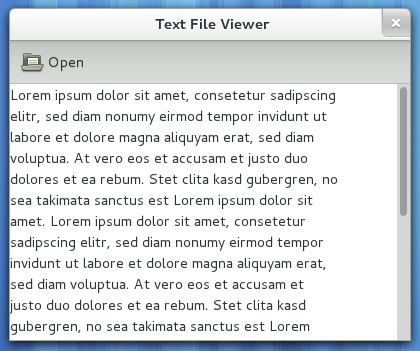
A simple text file viewer:
using Gtk;

public class TextFileViewer : Window {

    private TextView text_view;

    public TextFileViewer () {
        this.title = "Text File Viewer";
        this.window_position = WindowPosition.CENTER;
        set_default_size (400, 300);

        var toolbar = new Toolbar ();
        toolbar.get_style_context ().add_class (STYLE_CLASS_PRIMARY_TOOLBAR);

        var open_icon = new Gtk.Image.from_icon_name ("document-open",
            IconSize.SMALL_TOOLBAR);
        var open_button = new Gtk.ToolButton (open_icon, "Open");
        open_button.is_important = true;
        toolbar.add (open_button);
        open_button.clicked.connect (on_open_clicked);

        this.text_view = new TextView ();
        this.text_view.editable = false;
        this.text_view.cursor_visible = false;

        var scroll = new ScrolledWindow (null, null);
        scroll.set_policy (PolicyType.AUTOMATIC, PolicyType.AUTOMATIC);
        scroll.add (this.text_view);

        var vbox = new Box (Orientation.VERTICAL, 0);
        vbox.pack_start (toolbar, false, true, 0);
        vbox.pack_start (scroll, true, true, 0);
        add (vbox);
    }

    private void on_open_clicked () {
        var file_chooser = new FileChooserDialog ("Open File", this,
                                      FileChooserAction.OPEN,
                                      "_Cancel", ResponseType.CANCEL,
                                      "_Open", ResponseType.ACCEPT);
        if (file_chooser.run () == ResponseType.ACCEPT) {
            open_file (file_chooser.get_filename ());
        }
        file_chooser.destroy ();
    }

    private void open_file (string filename) {
        try {
            string text;
            FileUtils.get_contents (filename, out text);
            this.text_view.buffer.text = text;
        } catch (Error e) {
            stderr.printf ("Error: %s\n", e.message);
        }
    }

    public static int main (string[] args) {
        Gtk.init (ref args);

        var window = new TextFileViewer ();
        window.destroy.connect (Gtk.main_quit);
        window.show_all ();

        Gtk.main ();
        return 0;
    }
}
Compile and Run
$ valac --pkg gtk+-3.0 gtk-text-viewer.vala
$ ./gtk-text-viewer
If you want to reuse your file dialog setup or add additional functionality you can subclass FileChooserDialog. This one remembers the last folder:
using Gtk;

public class OpenFileDialog : FileChooserDialog {

    private string last_folder;

    public OpenFileDialog () {
        this.title = "Open File";
        this.action = FileChooserAction.OPEN;

        add_button (Stock.CANCEL, ResponseType.CANCEL);
        add_button (Stock.OPEN, ResponseType.ACCEPT);
        set_default_response (ResponseType.ACCEPT);

        if (this.last_folder != null) {
            set_current_folder (this.last_folder);
        }
    }

    public override void response (int type) {
        if (type == ResponseType.ACCEPT) {
            this.last_folder = get_current_folder ();
        }
    }

    public static void main (string[] args) {
        Gtk.init (ref args);

        var ofd = new OpenFileDialog ();

        if (ofd.run () == ResponseType.OK) {
            stdout.printf ("filename = %s\n".printf (ofd.get_filename ()));
        }
    }
}
Creating a Dialog
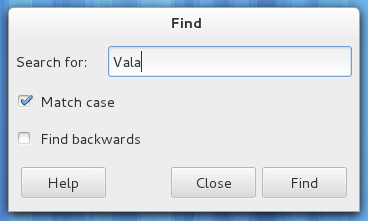
This example demonstrates how to create a dialog by subclassing Dialog.
using Gtk;

public class SearchDialog : Dialog {

    private Entry search_entry;
    private CheckButton match_case;
    private CheckButton find_backwards;
    private Widget find_button;

    public signal void find_next (string text, bool case_sensitivity);
    public signal void find_previous (string text, bool case_sensitivity);

    public SearchDialog () {
        this.title = "Find";
        this.border_width = 5;
        set_default_size (350, 100);
        create_widgets ();
        connect_signals ();
    }

    private void create_widgets () {

        // Create and setup widgets
        this.search_entry = new Entry ();
        var search_label = new Label.with_mnemonic ("_Search for:");
        search_label.mnemonic_widget = this.search_entry;
        this.match_case = new CheckButton.with_mnemonic ("_Match case");
        this.find_backwards = new CheckButton.with_mnemonic ("Find _backwards");

        // Layout widgets
        var hbox = new Box (Orientation.HORIZONTAL, 20);
        hbox.pack_start (search_label, false, true, 0);
        hbox.pack_start (this.search_entry, true, true, 0);
        var content = get_content_area () as Box;
        content.pack_start (hbox, false, true, 0);
        content.pack_start (this.match_case, false, true, 0);
        content.pack_start (this.find_backwards, false, true, 0);
        content.spacing = 10;

        // Add buttons to button area at the bottom
        add_button (Stock.HELP, ResponseType.HELP);
        add_button (Stock.CLOSE, ResponseType.CLOSE);
        this.find_button = add_button (Stock.FIND, ResponseType.APPLY);
        this.find_button.sensitive = false;

        show_all ();
    }

    private void connect_signals () {
        this.search_entry.changed.connect (() => {
            this.find_button.sensitive = (this.search_entry.text != "");
        });
        this.response.connect (on_response);
    }

    private void on_response (Dialog source, int response_id) {
        switch (response_id) {
        case ResponseType.HELP:
            // show_help ();
            break;
        case ResponseType.APPLY:
            on_find_clicked ();
            break;
        case ResponseType.CLOSE:
            destroy ();
            break;
        }
    }

    private void on_find_clicked () {
        string text = this.search_entry.text;
        bool cs = this.match_case.active;
        if (this.find_backwards.active) {
            find_previous (text, cs);
        } else {
            find_next (text, cs);
        }
    }
}

int main (string[] args) {
    Gtk.init (ref args);
    var dialog = new SearchDialog ();
    dialog.destroy.connect (Gtk.main_quit);
    dialog.show ();
    Gtk.main ();
    return 0;
}
Compile and Run
$ valac --pkg gtk+-3.0 gtk-search-dialog.vala
$ ./gtk-search-dialog
Loading User Interface from XML File
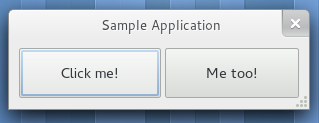
Instead of hand coding your application's user interface you can create it comfortably with a user interface designer such as Glade and save it as XML file. Your application can load the UI from this file at runtime with the help of the Gtk.Builder class. It can even connect all signals to their callback methods if you have declared them in Glade. Here's a sample UI file: sample.ui
This example code works with the UI file linked above:
using Gtk;

public void on_button1_clicked (Button source) {
    source.label = "Thank you!";
}

public void on_button2_clicked (Button source) {
    source.label = "Thanks!";
}

int main (string[] args) {
    Gtk.init (ref args);

    try {
        // If the UI contains custom widgets, their types must've been instantiated once
        // Type type = typeof(Foo.BarEntry);
        // assert(type != 0);
        var builder = new Builder ();
        builder.add_from_file ("sample.ui");
        builder.connect_signals (null);
        var window = builder.get_object ("window") as Window;
        window.show_all ();
        Gtk.main ();
    } catch (Error e) {
        stderr.printf ("Could not load UI: %s\n", e.message);
        return 1;
    }

    return 0;
}
Compile and Run
You have to add the package gmodule-2.0 so that auto-connection of signals will work:
$ valac --pkg gtk+-3.0 --pkg gmodule-2.0 gtk-builder-sample.vala
Note: If you don't make the callback methods public you will get method never used warnings at this point.
$ ./gtk-builder-sample
Connecting callbacks
If you declare the callback methods inside a class and/or namespace you have to prefix the callback method in Glade with the namespace/class name in lower case letters and with underscores. For example, Foo.MyBar.on_button_clicked would be foo_my_bar_on_button_clicked in Glade:
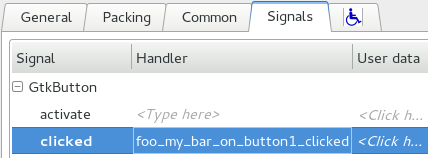
If you want the callback methods to be instance methods instead of static methods you have to annotate them with the [CCode(instance_pos=-1)] attribute and pass the instance to connect_signals(...) instead of null:
using Gtk;

namespace Foo {
    public class MyBar {

        [CCode (instance_pos = -1)]
        public void on_button1_clicked (Button source) {
            source.label = "Thank you!";
        }

        [CCode (instance_pos = -1)]
        public void on_button2_clicked (Button source) {
            source.label = "Thanks!";
        }
    }
}

// ...
        var object = new Foo.MyBar ();
        builder.connect_signals (object);
// ...
Attention: When using Gtk.Builder's signal auto-connection feature all handlers must have the full signatures of their corresponding signals, including the signal sender as first parameter. Otherwise you will get segmentation faults at runtime.
On Windows you have to add G_MODULE_EXPORT to the callbacks otherwise signal handlers won't be found. Use [CCode (cname="G_MODULE_EXPORT callback_name")] as a workaround. (cf. Bug 541548)
[CCode (cname = "G_MODULE_EXPORT on_button1_clicked")]
public void on_button1_clicked (Button source) {
    source.label = "Thank you!";
}

[CCode (cname = "G_MODULE_EXPORT on_button2_clicked")]
public void on_button2_clicked (Button source) {
    source.label = "Thanks!";
}
Tips and Tricks
gtkparasite allows you to inspect and modify your application's user interface at runtime. It's like Firebug for GTK+. Most distributions provide a package for gtkparasite. Launch with $ GTK_MODULES=gtkparasite appname. There's documentation and a screencast on the website.
You can follow GTK+ and friends on Twitter: @gtktoolkit
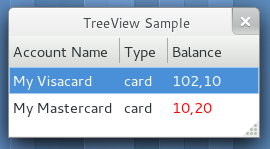
TreeView with ListStore
using Gtk;

public class TreeViewSample : Window {

    public TreeViewSample () {
        this.title = "TreeView Sample";
        set_default_size (250, 100);
        var view = new TreeView ();
        setup_treeview (view);
        add (view);
        this.destroy.connect (Gtk.main_quit);
    }

    private void setup_treeview (TreeView view) {

        /*
         * Use ListStore to hold accountname, accounttype, balance and
         * color attribute. For more info on how TreeView works take a
         * look at the GTK+ API.
         */

        var listmodel = new ListStore (4, typeof (string), typeof (string),
                                          typeof (string), typeof (string));
        view.set_model (listmodel);

        view.insert_column_with_attributes (-1, "Account Name", new CellRendererText (), "text", 0);
        view.insert_column_with_attributes (-1, "Type", new CellRendererText (), "text", 1);

        var cell = new CellRendererText ();
        cell.set ("foreground_set", true);
        view.insert_column_with_attributes (-1, "Balance", cell, "text", 2, "foreground", 3);

        TreeIter iter;
        listmodel.append (out iter);
        listmodel.set (iter, 0, "My Visacard", 1, "card", 2, "102,10", 3, "red");

        listmodel.append (out iter);
        listmodel.set (iter, 0, "My Mastercard", 1, "card", 2, "10,20", 3, "red");
    }

    public static int main (string[] args) {
        Gtk.init (ref args);

        var sample = new TreeViewSample ();
        sample.show_all ();
        Gtk.main ();

        return 0;
    }
}
Compile and Run
$ valac --pkg gtk+-3.0 gtk-treeview-liststore.vala
$ ./gtk-treeview-liststore
TreeView with TreeStore
using Gtk;

public class TreeViewSample : Window {

    public TreeViewSample () {
        this.title = "TreeView Sample";
        set_default_size (250, 100);
        var view = new TreeView ();
        setup_treeview (view);
        add (view);
        this.destroy.connect (Gtk.main_quit);
    }

    private void setup_treeview (TreeView view) {

        var store = new TreeStore (2, typeof (string), typeof (string));
        view.set_model (store);

        view.insert_column_with_attributes (-1, "Product", new CellRendererText (), "text", 0, null);
        view.insert_column_with_attributes (-1, "Price", new CellRendererText (), "text", 1, null);

        TreeIter root;
        TreeIter category_iter;
        TreeIter product_iter;

        store.append (out root, null);
        store.set (root, 0, "All Products", -1);

        store.append (out category_iter, root);
        store.set (category_iter, 0, "Books", -1);

        store.append (out product_iter, category_iter);
        store.set (product_iter, 0, "Moby Dick", 1, "$10.36", -1);
        store.append (out product_iter, category_iter);
        store.set (product_iter, 0, "Heart of Darkness", 1, "$4.99", -1);
        store.append (out product_iter, category_iter);
        store.set (product_iter, 0, "Ulysses", 1, "$26.09", -1);
        store.append (out product_iter, category_iter);
        store.set (product_iter, 0, "Effective Vala", 1, "$38.99", -1);

        store.append (out category_iter, root);
        store.set (category_iter, 0, "Films", -1);

        store.append (out product_iter, category_iter);
        store.set (product_iter, 0, "Amores Perros", 1, "$7.99", -1);
        store.append (out product_iter, category_iter);
        store.set (product_iter, 0, "Twin Peaks", 1, "$14.99", -1);
        store.append (out product_iter, category_iter);
        store.set (product_iter, 0, "Vertigo", 1, "$20.49", -1);

        view.expand_all ();
    }

    public static int main (string[] args) {
        Gtk.init (ref args);

        var sample = new TreeViewSample ();
        sample.show_all ();
        Gtk.main ();

        return 0;
    }
}
Compile and Run
$ valac --pkg gtk+-3.0 gtk-treeview-treestore.vala
$ ./gtk-treeview-treestore
TreeView with CellRendererToggle
using Gtk;

public class ListSample : Gtk.Window {

    private ListStore list_store;
    private TreeView tree_view;

    private enum Columns {
        TOGGLE,
        TEXT,
        N_COLUMNS
    }

    public ListSample () {
        this.title = "List Sample";
        this.destroy.connect (Gtk.main_quit);
        set_size_request (200, 200);

        list_store = new ListStore (Columns.N_COLUMNS, typeof (bool), typeof (string));
        tree_view = new TreeView.with_model (list_store);

        var toggle = new CellRendererToggle ();
        toggle.toggled.connect ((toggle, path) => {
            var tree_path = new TreePath.from_string (path);
            TreeIter iter;
            list_store.get_iter (out iter, tree_path);
            list_store.set (iter, Columns.TOGGLE, !toggle.active);
        });

        var column = new TreeViewColumn ();
        column.pack_start (toggle, false);
        column.add_attribute (toggle, "active", Columns.TOGGLE);
        tree_view.append_column (column);

        var text = new CellRendererText ();

        column = new TreeViewColumn ();
        column.pack_start (text, true);
        column.add_attribute (text, "text", Columns.TEXT);
        tree_view.append_column (column);

        tree_view.set_headers_visible (false);

        TreeIter iter;
        list_store.append (out iter);
        list_store.set (iter, Columns.TOGGLE, true, Columns.TEXT, "item 1");
        list_store.append (out iter);
        list_store.set (iter, Columns.TOGGLE, false, Columns.TEXT, "item 2");

        add (tree_view);
    }
}


void main (string[] args) {
    Gtk.init (ref args);
    var sample = new ListSample ();
    sample.show_all ();
    Gtk.main ();
}
Compile and run
$ valac --pkg gtk+-3.0 gtk-treeview-listsample.vala
$ ./gtk-treeview-listsample
Clipboard
Basic example use of the clipboard:
using Gtk;

int main (string[] args) {
    Gtk.init (ref args);

    var window = new Window ();
    window.title = "Clipboard";
    window.border_width = 10;
    window.set_default_size (300, 20);
    window.destroy.connect (Gtk.main_quit);
    var entry = new Entry ();
    window.add (entry);
    window.show_all ();

    var display = window.get_display ();
    var clipboard = Clipboard.get_for_display (display, Gdk.SELECTION_CLIPBOARD);
    // Get text from clipboard
    string text = clipboard.wait_for_text ();
    entry.text = text ?? "";

    // If the user types something ...
    entry.changed.connect (() => {
        // Set text to clipboard
        clipboard.set_text (entry.text, -1);
    });

    Gtk.main ();
    return 0;
}
Compile and run
$ valac --pkg gtk+-3.0 gtk-clipboard-sample.vala
$ ./gtk-clipboard-sample
Note: copy some text before running.
EntryCompletion with two cells
This example is based on http://www.valadoc.org/#!api=gtk+-3.0/Gtk.EntryCompletion but with two cells.
public class Application : Gtk.Window {

        public Application () {
                // Prepare Gtk.Window:
                this.title = "My Gtk.EntryCompletion";
                this.window_position = Gtk.WindowPosition.CENTER;
                this.destroy.connect (Gtk.main_quit);
                this.set_default_size (350, 70);

                // The Entry:
                Gtk.Entry entry = new Gtk.Entry ();
                this.add (entry);

                // The EntryCompletion:
                Gtk.EntryCompletion completion = new Gtk.EntryCompletion ();
                entry.set_completion (completion);

                // Create, fill & register a ListStore:
                Gtk.ListStore list_store = new Gtk.ListStore (2, typeof (string), typeof (string));
                completion.set_model (list_store);
                completion.set_text_column (0);

                var cell = new Gtk.CellRendererText ();
                completion.pack_start(cell, false);
                completion.add_attribute(cell, "text", 1);

                Gtk.TreeIter iter;

                list_store.append (out iter);
                list_store.set (iter, 0, "Burgenland", 1, "Austria");
                list_store.append (out iter);
                list_store.set (iter, 0, "Berlin", 1, "Germany");
                list_store.append (out iter);
                list_store.set (iter, 0, "Lower Austria", 1, "Austria");
                list_store.append (out iter);
                list_store.set (iter, 0, "Upper Austria", 1, "Austria");
                list_store.append (out iter);
                list_store.set (iter, 0, "Salzburg", 1, "Austria");
                list_store.append (out iter);
                list_store.set (iter, 0, "Styria", 1, "Austria");
                list_store.append (out iter);
                list_store.set (iter, 0, "Tehran", 1, "Iran");
                list_store.append (out iter);
                list_store.set (iter, 0, "Vorarlberg", 1, "Austria");
                list_store.append (out iter);
                list_store.set (iter, 0, "Vienna", 1, "Austria");
        }

        public static int main (string[] args) {
                Gtk.init (ref args);

                Application app = new Application ();
                app.show_all ();
                Gtk.main ();
                return 0;
        }
}
Compile and run
$ valac --pkg gtk+-3.0 EntryCompletionExample2.vala -o EntryCompletionExample2.a
$ ./EntryCompletionExample2.a