
|
Magnification: This page provides magnifier information related to GNOME Accessibility. |

Contents
Magnification in GNOME Shell
Overview
Magnification is an adaptive technology used primarily by persons with poor vision. It is currently offered through GnomeMag. GnomeMag is a CORBA service that any desktop application can call upon to magnify and otherwise enhance the desktop. CORBA is being deprecated in favour of D-Bus. There are two ways to proceed to insure that magnification remains available. One of these is to replace the current CORBA-based GnomeMag with a D-Bus version.
Another promising approach is to build magnifier functionality into GNOME Shell. This has some advantages:
GNOME Shell is (has) a compositing manager, and magnification can be thought of as a kind of compositing. This also opens the door to other graphics manipulations that may benefit users with low vision.
Magnifier functions can still be offered as a desktop service by using GObject Introspection to publish, via D-bus, important functions that other applications may wish to use. A obvious candidate is Orca.
This page is about a magnifier for the GNOME desktop built into GNOME Shell.
Current Status
The following sections outline what the GNOME Shell Magnifier does now, and where it's headed. The latest version of GNOME Shell (2.31.2 as of this writing) includes the magnifier functionality as documented below.
User Features
Implemented Features
- Show/hide magnifier
- toggles the magnifier.
- Show/hide is a user preference, handled by GSettings and available through the magnifier's D-Bus interface
GSettings: screen-magnifier-enabled (boolean value), schema: org.gnome.desktop.a11y.applications.
D-Bus: org.gnome.Magnifier.setActive(boolean)
- Mouse tracking modes: centred, push, proportional, and none.
Centred mode: The magnified mouse image is displayed at the centre of the magnifier, and the magnified contents are shifted within the magnified view. The point directly under the actual mouse pointer is placed under the magnified mouse cursor image. The visual effect is that the magnified contents scroll under the magnified mouse image as the actual mouse is moved around the screen.
Push mode: The magnified contents generally do not move, and the magnified mouse moves as the user moves the actual mouse. However, when the magnified pointer pushes against an edge of the magnified view, the magnified contents are scrolled into view. For example, if the user is moving the mouse towards the right edge of the magnifier view, then the magnified contents are shifted leftwards.
Proportional mode: Similar to centred in that the magnified contents scroll as the mouse is moved. However, the position of the magnified mouse image is not fixed at the centre of the magnified view. Instead, its position is representative of where the actual mouse pointer is on the screen. If the actual mouse is in the bottom left quadrant, and, say, half way between the centre and bottom of the screen, then the magnified cursor image is in the bottom left quadrant of the magnified view, half way towards the bottom of the magnified view. In this way the position of the magnified mouse cursor provides a clue to the user as to where the real mouse is on the desktop.
None: The contents of the magnified view are fixed, and do not move as the mouse moves. If the actual mouse image is over the content displayed within the magnified view, the magnified mouse is displayed in the corresponding location.
- Mouse tracking mode is a user preference, and handled by GSettings:
mouse_tracking (enum), schema: org.gnome.desktop.a11y.magnifier.
nick 'none' (value = 0)
nick 'centered' (value = 1)
nick 'proportional' (value = 2)
nick 'push' (value = 3)
- Magnified view optionally positioned to the:
- top half of the screen,
- bottom half,
- left half,
- right half,
- full screen, or
- a smaller view scaled to the size of the screen in the bottom left hand corner.
- View position is a user preference, handled via GSettings:
GSettings: screen-position (enum), schema: org.gnome.desktop.a11y.magnifier.
nick 'full-screen' (value = 1)
nick 'top-half' (value = 2)
nick 'bottom-half' (value = 3)
nick 'left-half' (value = 4)
nick 'right-half' (value = 5)
DBus: org.gnome.Magnifier.ZoomRegion.moveResize(array [x, y, width, height])
- System pointer:
- hide the actual mouse cursor when it overlaps the magnified view; reveal when it is over non-magnified parts of the desktop.
- always hide it when in full screen mode.
- acquire the sprite image for the system pointer and display a magnified version within the magnified view.
- magnified cursor image mimics changes of the system pointer image.
- Note: not a user preference.
- Magnified view optionally follows position of the actual mouse and appears as a movable lens.
- Lens mode is a user preference, and handled by GSettings:
lens-mode (boolean value), schema: org.gnome.desktop.a11y.magnifier.
- Lens mode is a user preference, and handled by GSettings:
- Crosshairs
- The mouse cursor, even when magnified, may be difficult to see for some users. A useful addition in this case is a cross hair that is centred on the magnified mouse image, moves with it, and whose vertical and horizontal "hairs" extend to the edges of the magnifier view.
- In terms of preferences, users can:
- enable/disable crosshairs:
GSettings: show-cross-hairs (boolean value), schema: org.gnome.desktop.a11y.magnifier.
DBus: org.gnome.Magnifier.setCrosswireSize(integer thickness)
- Modify the thickness, colour, length, opacity, and clipping of the crosshairs. "Clipping" refers to whether there is a transparent rectangle at the intersection of the vertical and horizontal "hairs".
GSettings (schema: org.gnome.desktop.a11y.magnifier):
cross-hairs-thickness (integer value)
cross-hairs-color (string value, e.g., "red" or "#ff00ffff")
cross-hairs-opacity (float value [0.0, 1.0]), where 0.0 is fully transparent, and 1.0 is fully opaque.
cross-hairs-length (integer value) [20, 4096] in pixels.
cross-hairs-clip (boolean value)
- DBus:
org.gnome.Magnifier.setCrosswireSize(integer size)
org.gnome.Magnifier.setCrosswireColor(unsigned integer color)
org.gnome.Magnifier.setCrosswireLength(integer length)
org.gnome.Magnifier.setCrosswireClip(boolean)
- enable/disable crosshairs:
- Inverse video, brightness and contrast.
- Some users prefer higher contrast, varying brightness levels, and/or "inverse video".
Inverse video is implemented as lightness inversion. Using the HSL colour model, this amounts to inverting lightness (L) while leaving hue (H) and saturation (S) untouched. L ranges from 0% (black) to 100% (white). With lightness inversion, darker colours become lighter, and vice versa; white and black are reversed; and "pure colours" are unchanged. Pure colours have maximum saturation (their lightness is 50%).
- Overall brightness changes involve changing the red, green, and blue channels. Brightness ranges from 0% (black) to (100%) white, where 50% represents no change..
- Contrast settings also involve modifying the red, green, and blue channels. Contrast ranges from 0% (minimal contrast) to 100% (maximum contrast), where 50% represents no change.
- GSettings:
invert-brightness (boolean value), schema: org.gnome.desktop.a11y.magnifier.
- Brightness change is represented by three values, one for each of the red, green, and blue channels. To change overall brightness, the three settings are modified in parallel.
- the three values range between -1.0 to 1.0, where zero indicates no change in brightness, negative values indicate a decrease in brightness and positive values, an increase.
brightness-red (floating point value), ranging between -1.0 to 1.0; schema: org.gnome.desktop.a11y.magnifier.
brightness-green (floating point value), ranging between -1.0 to 1.0; schema: org.gnome.desktop.a11y.magnifier.
brightness-blue (floating point value), ranging between -1.0 to 1.0; schema: org.gnome.desktop.a11y.magnifier.
- Contrast change is also represented by three values, one for each of the red, green, and blue channels. To change overall contrast, the three settings are modified in parallel.
contrast-red (floating point value), ranging between -1.0 to 1.0; schema: org.gnome.desktop.a11y.magnifier.
contrast-green (floating point value), ranging between -1.0 to 1.0; schema: org.gnome.desktop.a11y.magnifier.
contrast-blue (floating point value), ranging between -1.0 to 1.0; schema: org.gnome.desktop.a11y.magnifier.
- Focus and Caret Tracking.
- "Mouse tracking" is ensuring that the mouse pointer is always in view within the magnifier. It's a given since it is very difficult for a user to find the mouse pointer if it ever leaves the view. "Focus/caret tracking" solves a similar problem with respect to keyboard focus. When the keyboard focus changes, the contents of the magnified view shift to include the currently focussed widget and/or the text caret position; e.g., pressing alt+tab to invoke the task switcher. Note, this is especially true for keyboard only users.
- Four modes: centred, push, proportional, and none.
Centred : Magnified contents are scrolled such that the focussed widget or caret position is centred within the view.
Push: Contents are scrolled enough such that focus/caret position is within view. If it is already in view, the view does not change.
Proportional: Contents are scrolled such that the position of the focus/caret in the magnified view is proportional to its position on the desktop.
None: Turn tracking off; contents are not scrolled base of the current focus location and/or caret position.
- GSettings:
focus-tracking (enum), schema: org.gnome.desktop.a11y.magnifier
nick 'none'
nick 'centered'
nick 'push'
nick 'proportional'
caret-tracking (enum), schema: org.gnome.desktop.a11y.magnifier
nick 'none'
nick 'centered'
nick 'push'
nick 'proportional'
- Links:
Features in Development
- User interface for focus and caret tracking preferences.
- Multiple Displays
- Some users have two displays attached to their computer. They designate one of the displays for the "normal" view, and the other display is used for the magnified view. The use of two displays is for orientation. It is easy to lose one's place in a magnified view since much of the context is lost -- the whole screen cannot fit within a magnified view. Instead, the non-magnified display acts as a thumbnail for the user and they can use that as a way to orient themselves.
- Quick Access for Altering Magnification Factor.
- Having to open a preference dialog, locate the slider or spinner that is used to modify the magnification factor, and manipulate it is a user experience pain point. The magnifier will offer a mouse gesture and/or keystrokes for quickly changing the magnification factor. Possibilities include using the mouse scroll wheel with a keyboard modifier (e.g., control+wheel) to increase and decrease magnification; and control+shift+plus/control+shift+minus keystrokes to increase/decrease magnification factors.
Features and GNOME Versions
The following table lists the features described in the previous sections in terms of which version of GNOME they ship with. The "Functionality" column relates to what is implemented in GNOME Shell, "Settings" refers to the GSettings data that support the functionality, and "Preferences UI" to the dialog(s) that allow users to change those settings.
Features |
Functionality |
Settings |
Preferences UI |
Magnification, mouse tracking, position, and crosshairs |
3.0+ |
3.0+ |
3.4+ |
Inverse video, brightness, and contrast effects |
3.6+ |
3.6+ |
3.6+ |
Focus/Caret tracking |
3.10 |
3.10 |
3.12+ (est) |
Demo Videos
There are two videos showing the features of the magnifier. The videos are in ogg format (extension ".ogv").
- Magnifier
Demonstration of magnifier features - MagnifierDemo.ogv (86.3M).
- Orca+Magnifier
Demonstration of Orca's tracking of keyboard focus of UI components driving positioning of the magnified contents - Orca+MagnifierDemo.ogv (16.4M).
Magnifier Preferences Dialog
There are a couple of approaches to provide a GUI that allows users access to the magnifier's preferences (GSettings). They fall into two categories: a zoom options dialog for general use that is part of GNOME's Universal Access Panel, and a tool for testing and demonstrating the GNOME Shell Magnifier.
Universal Access Panel Zoom Options
The zoom options dialog for the Universal Access Panel (part of the GNOME Control Center project), has been merged into that project. A screen shot of the dialog is shown in Figure one, below.
|
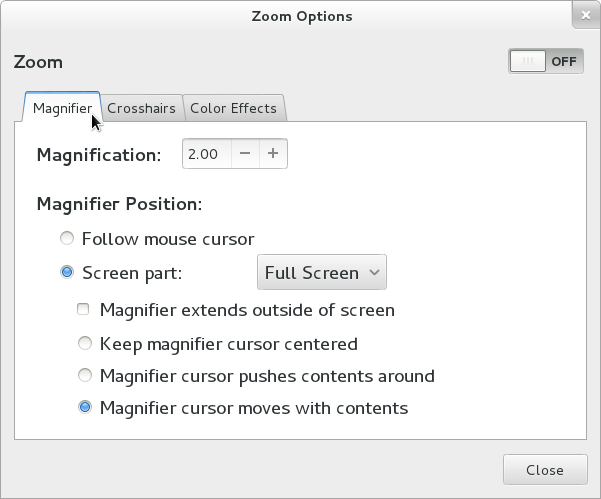
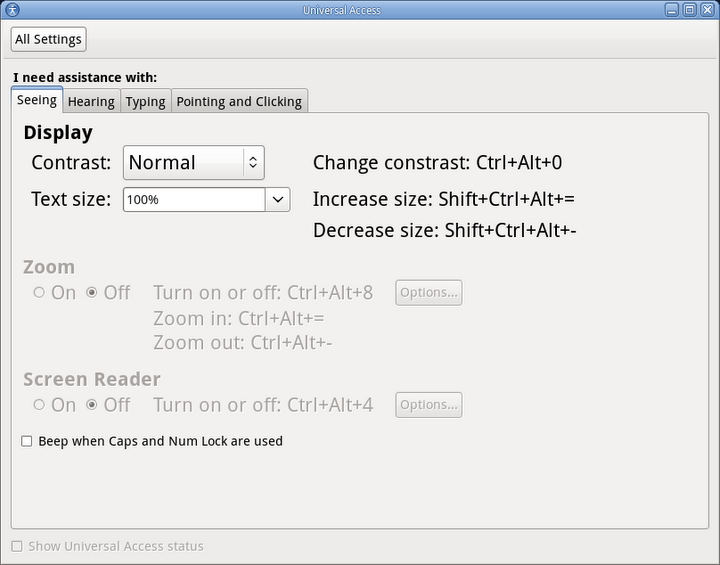
Figure 1. Universal Access Panel Zoom Options.
Use of the Universal Access Panel Zoom Options dialog is documented at the Zoom Options Dialog page.
Test Preferences
The purposes of this version of the UI is to test and/or demonstrate the GNOME Shell magnifier. There is a low-priority effort to provide a standalone tarball of this dialog for those who want to try it out. The work was tracked at bug 622414 in bugzilla, but that has stopped. Figure two is a screen shot.
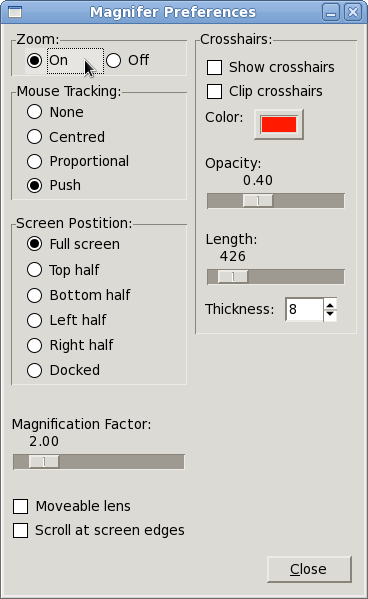
Figure 2. Demo preferences dialog.
Changing the state of the the widgets in this dialog changes the GSettings values listed above, and they are immediately reflected in the magnifier itself.
Note that the preferences, GSettings, and behaviour are exactly the same in the two versions of the preferences dialog. One dialog is aimed more at testing; the other at end users.
GSettings vs. D-Bus: Common Magnifier Framework
GSettings is GNOME's way of storing persistent user configuration parameters. Magnification preferences will be stored using GSettings. In particular, user preferences will be accessed using GSettings.
GSettings represents another communication path between the magnifier and out-of-process applications such as Orca. (The other communication technique is via D-Bus). For example, the user might set a number of preferences using Orca before launching the magnifier. Those preferences could be saved in the user's GSettings data. When the magnifier is launched, it initializes itself from that data.
This communication path is two way. For example, if the user changes the magnification factor with a key stroke, the associated GSetting value is updated from within the magnifier itself. An out-of-process application could be notified of the change, or react appropriately to the change.
Which magnification settings are persistent user preferences, and which are features that a service provides has been under discussion for some time. The issue was addressed at the AEGIS Seville GNOME Hackfest in Oct, 2010. The outcome is documented on the Common Magnifier Framework page.
D-Bus
The magnifier is published as a D-Bus service, named "org.gnome.Magnifier". As noted in the Common Magnifier Framework age, the implementation will ultimately match that defined by gnome-mag. But, at present, the GNOME Shell magnifier supports only a subset thereof, listed below:
org.gnome.Magnifier
void setActive (boolean)
boolean isActive()
void showCursor()
void hideCursor()
ZoomRegion createZoomRegion(double xMagFactor, double yMagFactor, array roi, array viewPort)
the arrays have the form [left, top, right, bottom].
boolean addZoomRegion(zoomRegion)
ZoomRegion array getZoomRegions()
void clearAllZoomRegions()
boolean fullScreenCapable()
void setCrosswireSize(size)
int getCrosswireSize()
void setCrosswireLength(integer length)
int getCrosswireLength()
void setCrosswireColor(unsigned integer color)
unsigned integer getCrosswireColor()
void setCrosswireClip(boolean)
boolean getCrosswireClip()
org.gnome.Magnifier.ZoomRegion
void setMagFactor(double xMagFactor, double yMagFactor)
double array getMagFactor()
void setRoi(array [left, top, right, bottom])
integer array getRoi()
the array has the form [left, top, right, bottom].
boolean shiftContentsTo(x,y)
note that shiftContentsTo() is available only in the GNOME Shell magnifier implementation of the D-Bus service. The plan is to add it to the GnomeMag implementation.
void moveResize(array [left, top, right, bottom])
GNOME Shell Magnifier is part of the ÆGIS (Ontario) Project. It is funded and supported by the Ontario Ministry of Economic Development and Innovation and the ÆGIS (Europe) Project.